A Slightly Different Post
Good morning, good evening, good night? Wherever you are. Welcome!
This post is cross-posted from my GitHub and outlines a piece of experimental work I recently undertook in secrets detection in YouTube video frames (hunting for API keys). It did not end up working too well, but I thought I’d document the process anyway. If you are interested in the code used to fine tune the model, the Jupyter notebook has been provided here. Infact, to say it did not work too well is an understatement! Enjoy.
Fovea
fovea: a small depression in the retina where visual acuity is highest. The centre of the field of vision is focused in this region, where retinal cones are particularly concentrated.
An (failed) experiment in visual API key detection using transfer learning.
What is Fovea?
So there I was, playing around with Trufflehog one day doing some recon, and I oepned an GitHub issue with half an API key hanging off it. Harmless. But I thought; are images getting the same attention as text-based secret scanners?
Tools like GitGuardian, truffleHog, and detect-secrets are excellent at scanning code repositories for credential strings. But they operate on text. They cannot scan a YouTube video where a developer accidentally flashes their terminal, or a Medium article where a screenshot contains a real key. Fovea was an attempt to close that gap using computer vision AND to help me complete my first transfer learning project as part of the Fast AI course.
Spoiler: it partially worked, and almost completely failed in interesting ways. Both outcomes are documented here.
Hypothesis
Given the distinctive prefix formats of modern AI API keys (sk-proj-, sk-ant-api03-, sk-svcacct-, hf_, etc.), a relatively small training dataset of manually collected screenshots should be sufficient to fine-tune a pretrained vision model to recognise these patterns in arbitrary visual contexts.
In an age where everyone is suddenly an AI guru, selling courses and posting tutorials, I assume there’s quite a few leaked keys floating in Youtube frames and Medium articles. If you’re in security; you understand the risk. Many people fail to realise these are akin to passwords, though, and thus inadvertently leak them online. We’ve all seen those clips of streamers flashing up their cryptocurrency wallet’s private key on a sticky pad desktop window. They’re exactly the king of things I was aiming to catch.
Approach
Model
Fovea uses transfer learning with ResNet34, pretrained on ImageNet, fine-tuned using the FastAI library. The final classification layer was retrained to perform binary classification: valid (contains a real API key) vs invalid (does not contain a real API key). Fine-tuning differs from training a model from scratch; here we just influence the final classification layers to help ‘steer’ the model to have better focus on specific patterns. In essence, far less data should be required to get relatively accurate results.
This is loosely based on Jeremy Howard’s FastAI Lesson 1 “Is it a bird?” classifier, but adapted for a real security research use case. Identifying a bird vs a forest is apparently a far easier use case than identifying the difference between sk-proj-nn2gwrhgi3whni32hn and sk-proj-abcdefg12356780.
Training Data
Training data was collected manually by searching GitHub for known API key prefixes and taking screenshots in various contexts. Manual collection was chosen over automated scraping to ensure data quality and variety. Overall, I collected around 231 images of GitHub code pages, with different colour schemes set on my GitHub profile to similar differing terminal and background colours. This was a little bit of a drag, but I wanted to choose keys that legitimately were keys being leaked, rather than relying on programatically trying to grab them. In an attempt to be clever, I ensured the key was always appearing in a different part of the image. I hoped this would avoid the model thinking that ‘valid = key-looking-string-at-xyz-screen-coordinates’.
Valid class (images with keys):
| Provider | Prefix |
|---|---|
| OpenAI | sk-proj-, sk-svcacct-, sk-none-, sk- |
| Anthropic | sk-ant-api03- |
| Gemini | AIzaSy- |
| HuggingFace | hf_ |
| GitHub | ghp_, gho_ |
| Stripe | sk_live_, pk_live_ |
Invalid class (images without keys): For the invalid classes, I also use images of code, some with no secrets at all, but also some with various red herrings that I hoped would help the model differentiate between truly valid and fake example keys. This included the following:
- Code snippets with placeholder keys (
OPENAI_API_KEY=your-key-here) - Code with long random-looking strings that aren’t keys (UUIDs, hashes, base64)
- Configuration files with redacted credentials
- Faux-pas keys: realistic-looking but invalid strings (
sk-ant-api03-examplekey0123)
Dataset size: ~231 valid, ~256 invalid images
Data variety: Screenshots were taken at varying zoom levels, window sizes, with different IDE themes (dark/light), from GitHub issues, READMEs, code files, and terminal output. This was intentional, as real-world leaks appear in many visual contexts.
I have not included the training data, or the model here, as even though they were all sourced from GitHub repositories, it didn’t feel right to expose a load of potentially valid keys. I didn’t confirm if a key was valid, either, by making any API calls. This is irrelevant for the exercise, as I was fine-tuning the model on the appearance of valid keys, rather than whether they were active. Though, writing this out, that could be a cool extra validation step.
Training Configuration
I ran tons of training blocks using the DataBlocks class with various seeds, validation set %’s, varying batch sizes, epochs, etc. until finding one that consistently reported around an 85% accuracy rate. These were all run in Kaggle on a Jupyter notebook. The fovea.ipynb file has been included if you would like to review it. I have added comments into most blocks to show the results of each training run as well as some mental notes.
learn = vision_learner(dls, resnet34, pretrained=True, metrics=error_rate)
learn.fine_tune(30)
- Image resize: 256-512px with padding
- Batch size: 8
- Epochs: 10-30
- Augmentation: None (flipping/rotation would distort text)
The variance across random seeds indicates sensitivity to which images end up in the validation split, which is a function of dataset size (20% kept aside and used for validation).
One thing to note is that, as I mentioned before, I purposefully took training data with the keys in different places on the screen, and screenshots of varying sizes. This was intentional; a key flashing up in a YouTube tutorial may be in any screen region, as well as be any size, against any background colour, and the dimensions of the video may also vary from full screen to a zoomed in terminal. In hindsight, this was still the correct move, however I had not realised that FastAI required image resizing to be performed during each training run. Thus, screenshots of valid keys that were small were blown up to 512px, and full screen ones were going to be greatly distorted. Still, with 85% accuracy being shown on some training runs, I was confident that it wasn’t going to destroy the experiment!
Results
Kaggle Validation (Initial Screenshots)
If you look into the Jupyter notebook, at the very end, you will see a small initial test I ran on 5 screenshots (2 valid keys, 3 invalid keys).
On held-out screenshots from the same type of screenshots as training data, the model performed well:
Result: valid
Confidence level: 77.40% that this is a real key.
Result: valid
Confidence level: 95.08% that this is a real key.
Result: invalid
Confidence level: 22.26% that this is a real key.
Result: invalid
Confidence level: 35.33% that this is a real key.
Result: invalid
Confidence level: 45.24% that this is a real key.
I was feeling pretty good at this point, and optimistic on the results of the experiment! So I went ahead and vibe coded a YouTube video downloader-splitter-predictor-thingy. Basically:
- Take a URl or list of URLs and download the YT video
- Split it into frames at the designated frame splitting rate (1s was fine for testing)
- Run each image into the exported model and check it against a confidence threshold
- Flag frames where a key was potentially present
Real-World YouTube Video Test
So I created a fake YouTube video of me going over random code - see the video here. Several frames in the video had me flashing a key randomly. Plugged into into the Fovea UI, set the Threshold to 95% confidence as a ‘valid’ key, and got the following:
HTTP Request
POST /api/scan HTTP/1.1
Host: localhost:5001
User-Agent: Mozilla/5.0 (Macintosh; Intel Mac OS X 10.15; rv:147.0) Gecko/20100101 Firefox/147.0
Accept: application/json, text/plain, */*
Accept-Language: en-GB,en;q=0.9
Accept-Encoding: gzip, deflate, br
Content-Type: application/json
Content-Length: 86
Origin: http://localhost:5173
Connection: keep-alive
Referer: http://localhost:5173/
Sec-Fetch-Dest: empty
Sec-Fetch-Mode: cors
Sec-Fetch-Site: same-site
Priority: u=0

{"urls":["https://www.youtube.com/watch?v=P3r_VZh23ZU"],"interval":1,"threshold":0.95}
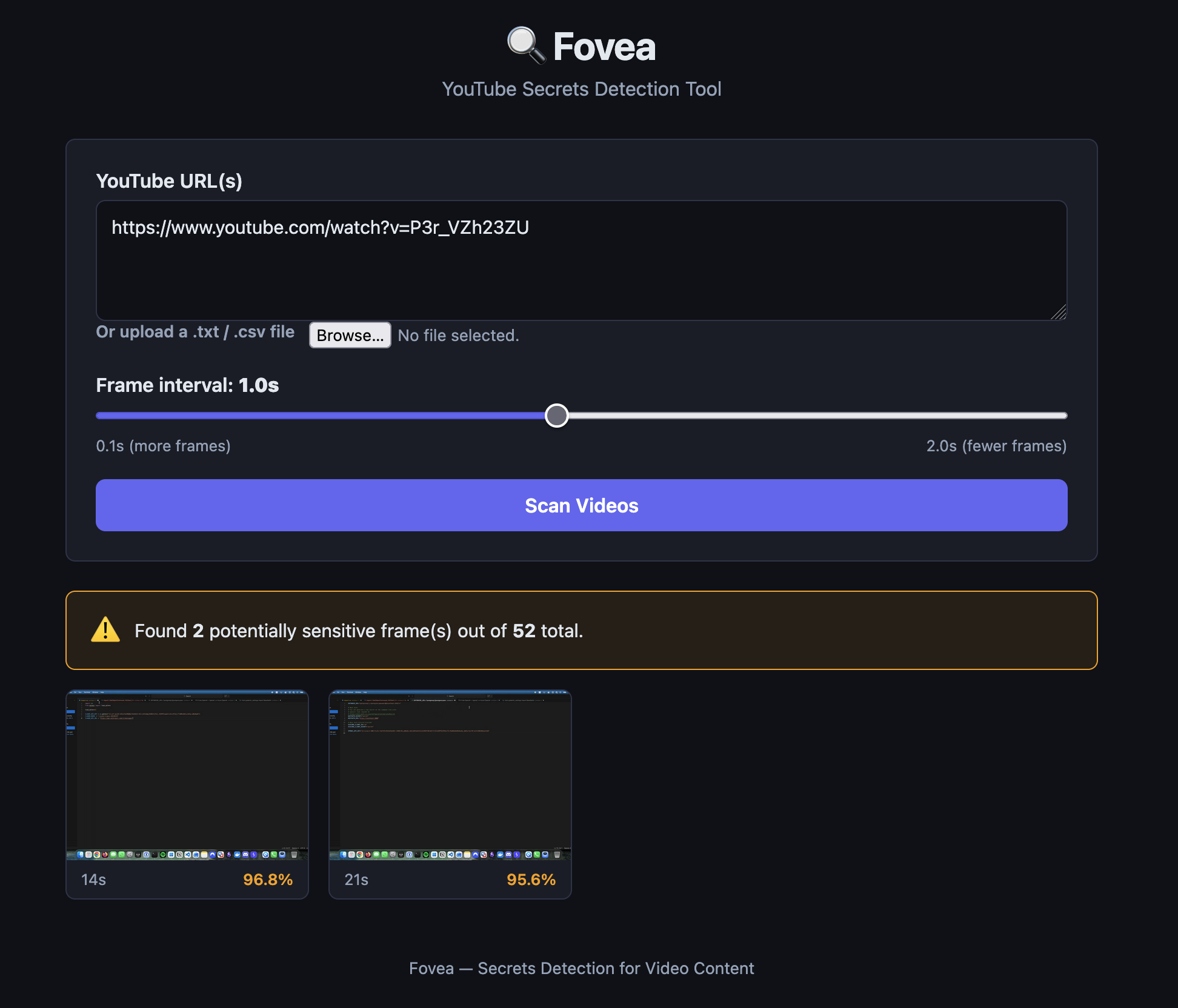
2 valid results! And the screenshots it pulled out were both actual keys.
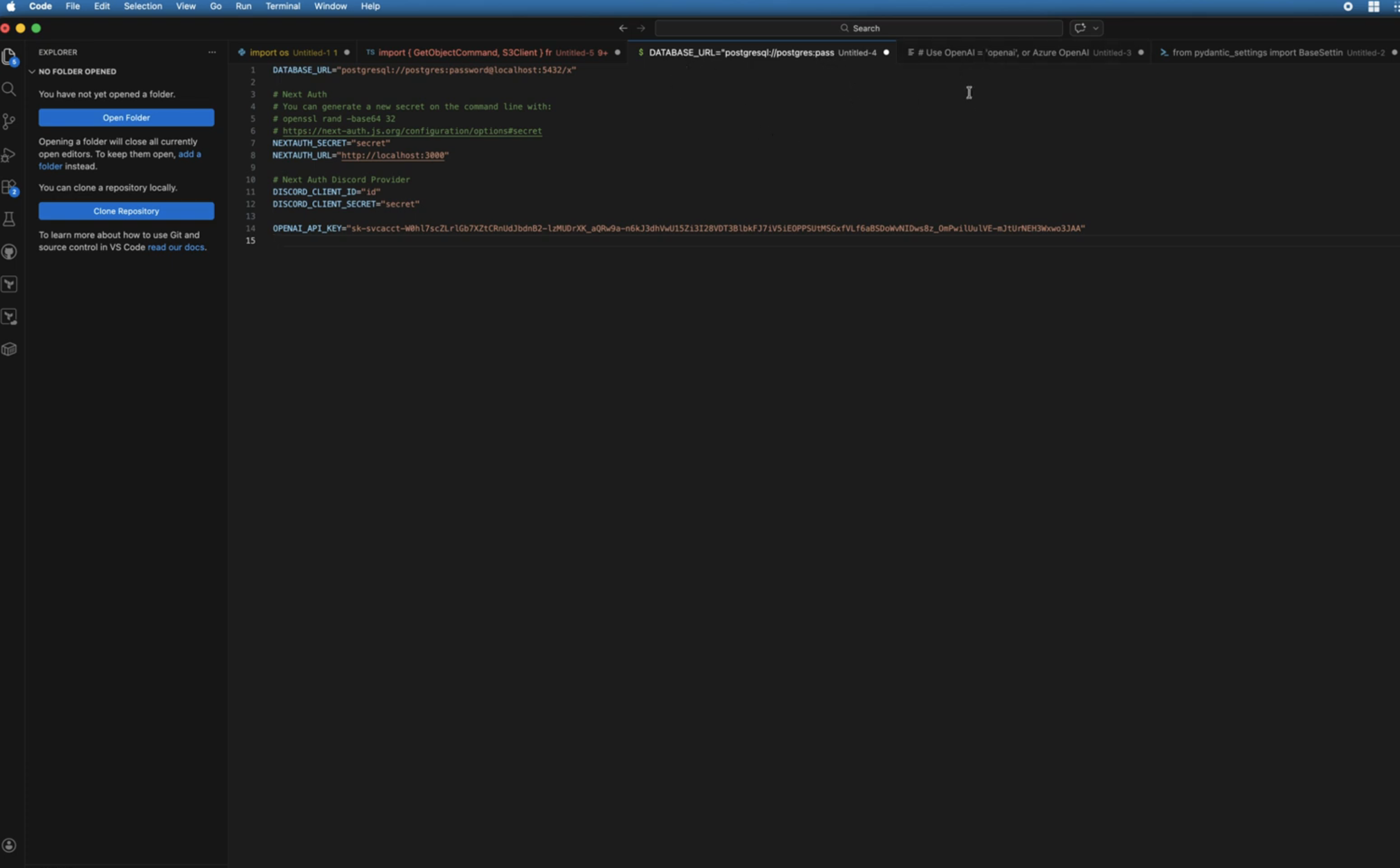
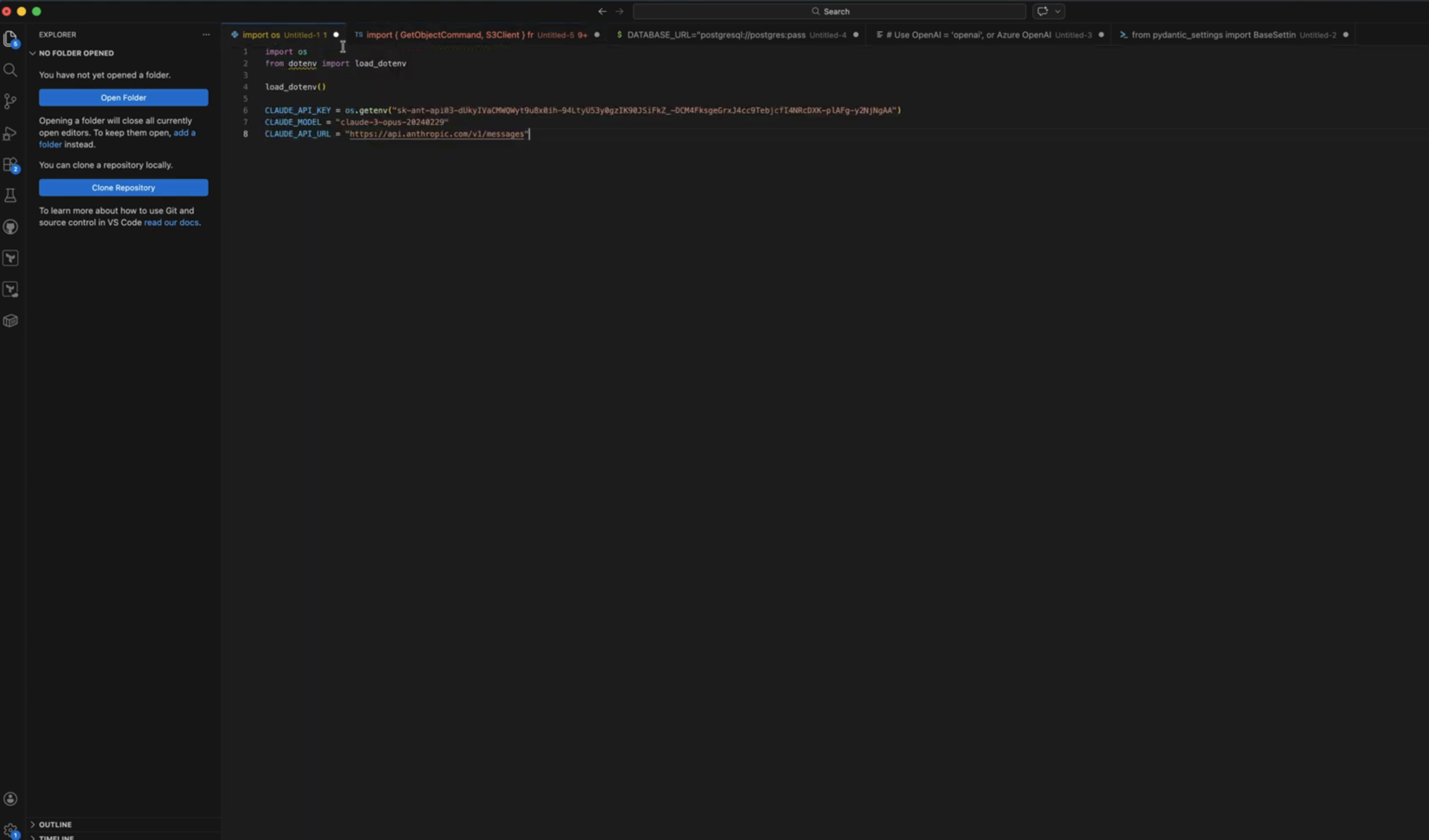
At this point, I was pretty pleased; there were keys it missed in the video, and when I lowered the threshold it got lots of junk that was just code. But at 95%, it got two of the leaks. Nice.
However, when running it against a few more videos, I realised that this was probably the most erratic secrets detector ever.
If you were an early Vine user, you’d remember Damn Daniel…
Well, Fovea vs a Damn Daniel frame:
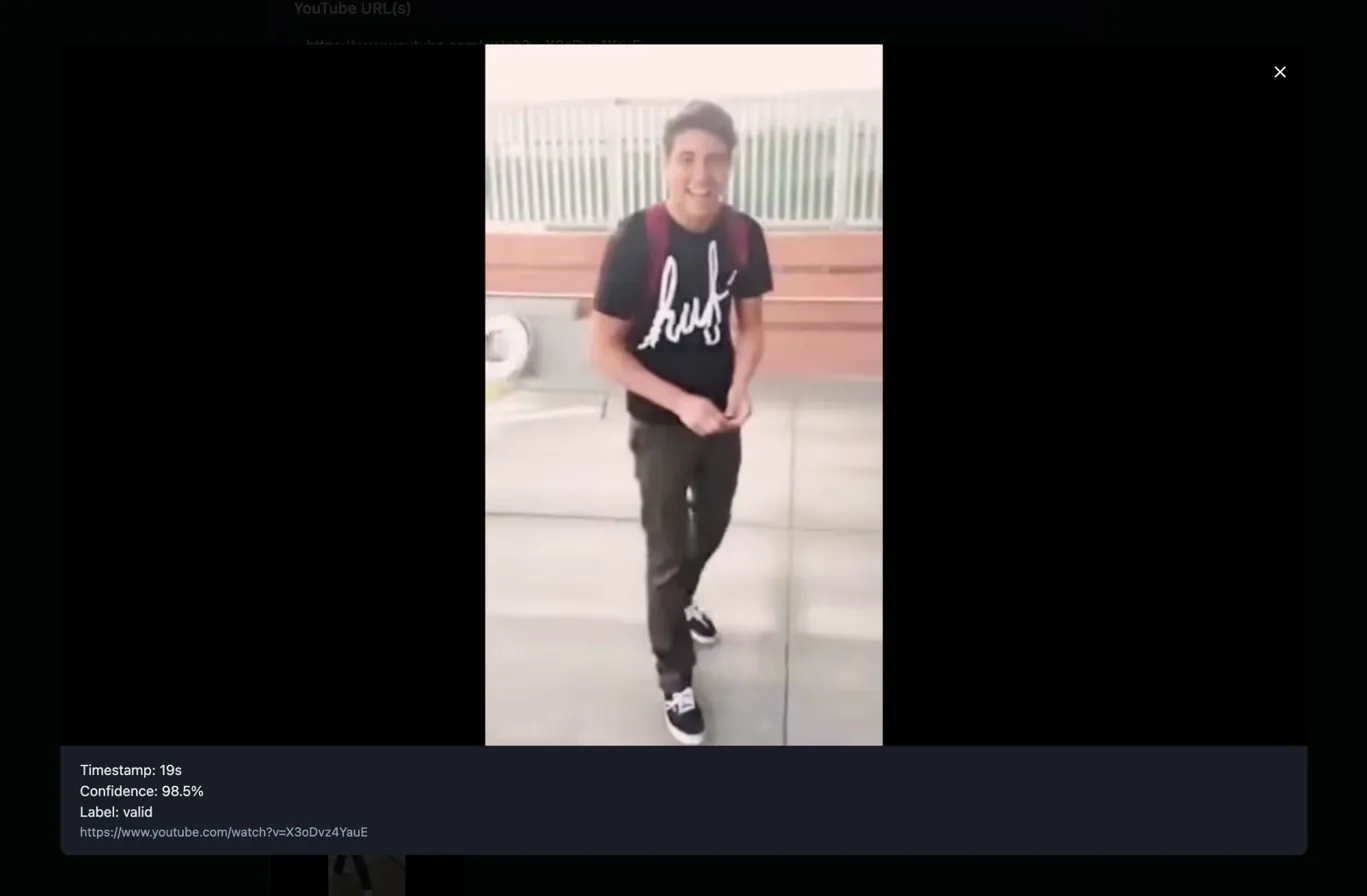
I then ran it against some random videos that were titled things like ‘Set up your OpenAI API’ and the like. Each time it was flagging lots of junk, whilst also adding high confidence flags on pages where API keys were entered or obfuscated.
So it wasn’t terrible. It just wasn’t behaving how I’d hoped the training would have resulted in: differentiating between a box that says ‘API key’ and a real key. Most importantly, I wasn’t expecting it to flag so heavily on Damn Daniel. I can only hypothesise that the black borders on the image somewhat resemble a terminal. But I have no idea.
In an attempt to give the model more context about ’this absolutely is never a key’ - I took 50 random unsplash photos and added them to a Kaggle dataset, then included these in a new training run as invalid data. Sadly, this didn’t improve my results at all, and I shelved it for future experimentation.
I was going to just leave Fovea and never share the world my lessons; but I’m trying to learn more in public and accept that things not working is part of the process. So here we are; the premise wasn’t proven, but it’s interesting nonetheless I think. In my defence, I am a hacker, not a ML/software engineer ;-)
Why It Failed
Just a few thoughts on why I think it failed. I haven’t spoken to anyone actually good at this stuff, so it’s all hypothetical (#dyor).
Distribution Shift
The model was trained exclusively on GitHub screenshots. This means browser windows, terminals, code editors with consistent UI patterns, fonts, and colour schemes. It never saw real video frames during training, different fonts, hell even the font colours would’ve mostly been the same. I was hoping that it was going be fixing on shapes of letters in a correlated pattern, but that didn’t seem to come through in the data.
When deployed against YouTube content, it encountered a completely different visual domain. The model had no reference for “this is definitely not code” and made confident guesses based on spurious visual patterns, potentially including black padding around video frames that structurally resembled training images. Ultimately, my invalid training data probably was just too close to my training data, and that was done to try and discern the invalid example keys from the valid leaked keys. I think we just needed more and more data to better help it learn what a valid key was, or maybe, I could have just focused on one specific API key type (rather than different providers).
So, in a nutshell, I think the model learned to classify images that look like training data, not images that contain API keys.
Validation Methodology
When I was doing validation, I was using screenshots from the same source as training data, which obviously (looking back) gave misleadingly optimistic results. Testing on the actual deployment target (video frames) early would have surfaced the distribution shift problem immediately and stopped me wasting a sh*t ton of time :-)
Note for future Toby from a sad present Toby: Always test on data from your actual deployment domain, not just very similar examples from your training source.
Sooooo.. Next Time?
Option 1: OCR + Regex
Extract text from video frames using EasyOCR or Tesseract, then run regex patterns against extracted text. Simple, reliable, actually solves the problem. No ML required. Probably actually solves the problem better. But I was here to learn some ML, not mess with regex! Ultimately this is just something I could extend to Trufflehog or Noseyparker.
Option 2: Vision-Language Model
Use a model (CLIP, GPT-4V) that understands both images and text semantics. Ask “does this image contain an API key?” rather than training a binary classifier. Probably feasible at a local level using a local model, but costly using APIs - especially for longer videos. Probably ok for scraping images from GH issues.
Option 3: Better Training Data
Collect training data from the actual deployment context. Rather than just scouring GitHub like a lunatic, I could have gotten real video frame captures, not GitHub screenshots. Including “person on screen”, “terminal in video”, “IDE in tutorial” as explicit negative examples would’ve potentially helped with the crazy incorrect results.
It was a good learning experience, regardless of my inconclusive end result. There’s definitely room for improvement, though the adversarial benefits are, in my opinion, unrewarding for targeted attacks. Similar to ’lets find secrets in docker registry images’, this would’ve been a ‘wide net’ cast to try and find valid secrets and improve security at scale. I’m not saying I won’t come back to this concept; but I need to refine it and make the methodology more compatible with the task. For learning though, it was great.
Laters y’all, keep hacking.